


AI Music Generator PRO X
4.543.00 Reviews
App Specs
- Version
- 2.0
- Updated On
- License
- Free
- Downloads
- 100,000+
- Developer
- Mor Tosbaa Mobile
- Categories
- Productivity
- Platform
- Android
Screenshots
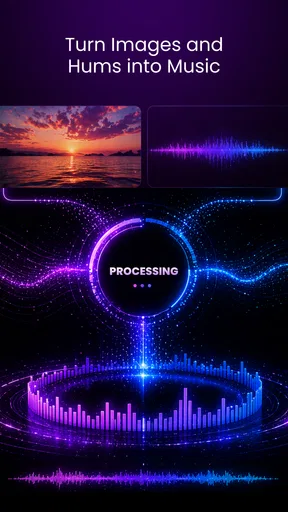
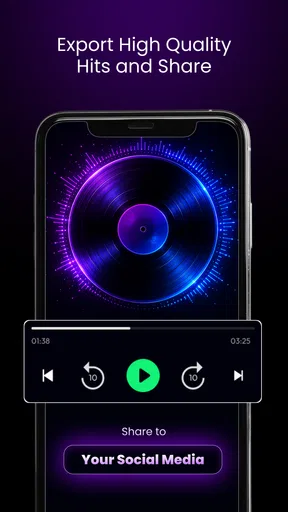
 Analysis by AppCompare
I approached AI Music Generator PRO X as a quick way to turn an idea into something I could actually listen to, rather than as a replacement for a full music studio. It is a free productivity app from Mor Tosbaa Mobile, aimed at people who want to work with text, lyrics, and vocals while building AI-assisted tracks. That positioning makes sense: the app is most useful when I have a musical thought but not the time, equipment, or technical confidence to develop it from scratch.
My first impression is that its appeal comes from reducing the distance between a rough concept and a shareable audio result. I can begin with a written idea, shape it with lyrics, or bring vocals into the process, then export and share the finished track. That makes it suitable for sketches, playful experiments, short creative projects, and early songwriting sessions. It is less convincing if I expect the precision of a traditional digital audio workstation, where every instrument, take, effect, and edit can be controlled manually.
What to expect before making your first track
The name suggests a specialized music tool, but the app fits the productivity category because its main value is helping me complete a creative task efficiently. Instead of opening a complex workstation and staring at an empty timeline, I can start with an idea in ordinary language. That is a meaningful difference for first-time users who may understand the mood they want long before they know how to arrange drums, harmony, or vocals.
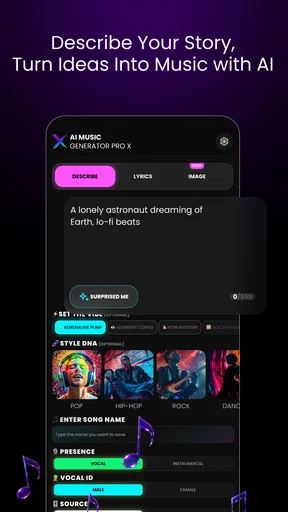
The basic promise is easy to understand: create music from text, lyrics, and vocals, then export and share the result. In practice, I would treat those inputs as different starting points rather than expecting every attempt to behave identically. A text prompt is useful when I am still defining a direction. Lyrics become more valuable when the words and their delivery matter. Vocals are the better starting point when I already have a melody or performance that should guide the track.
That flexibility is one of the app's strongest qualities, but it also creates the first important trade-off. The more specific my idea becomes, the more carefully I need to describe what I want. A vague request may produce something that is pleasant but not especially personal. A focused brief gives the app a clearer creative target, although I still need to judge whether the result matches the emotion, pacing, and purpose I had in mind.
I would not install this expecting a finished commercial master after one tap. I see it more as a fast creative partner for generating a starting point or a usable draft. That distinction matters because AI music tools can be exciting during the first few minutes and frustrating if I expect perfect control over every detail. The best experience comes from listening critically, keeping the parts that work, and treating weaker results as material for another attempt.
The app is free to install, which makes experimenting less intimidating. It also includes in-app purchases ranging from $6.99 to $39.99 per item, so I would check the purchase screen carefully before committing to anything beyond the free experience. For a casual user, the free entry point is useful for deciding whether the workflow feels natural. For someone planning regular music creation, the purchase structure becomes part of the decision rather than a detail to ignore.
Worth Reading Before You Choose

EA SPORTS FC Mobile 26 Is a Bigger Football Game, but It Takes Time

Flipboard Shows What News Apps Must Do Beyond the Feed

Switching to Android Auto Means Rethinking Your Driving Routine

Google Calendar Makes a Crowded Week Easier to Manage

Ludo King Makes the Most of the Minutes Between Plans

Baby Panda World Brings Quick Play to Modern Phones, but Its Game Library Feels Busy
Its age rating is Everyone, and the minimum operating-system requirement is Android 7.0. That gives it a broad starting audience on Android devices, including people who are not using the newest phone. The current version is 2.0, so I would still keep expectations practical: compatibility does not automatically mean that every device will offer the same speed or comfort during audio generation and playback.
Who will get the most from it
I think the strongest audience is the curious beginner who wants to hear an idea without learning a complete production environment first. It also suits a lyricist who can write verses but struggles to imagine an arrangement, a content creator who needs a custom musical sketch, or a vocalist who wants to explore how a performance might sit inside a broader track.
There is also a useful role for people who already make music. I would use the app for rapid ideation: testing a mood, exploring a hook, or creating a rough reference before rebuilding the best parts with more precise tools. That workflow prevents the app from having to carry the entire production. It becomes a source of possibilities rather than the only place where the song exists.
I would skip it if my priority is detailed multitrack editing, exact mixing decisions, or a fully transparent production process. A conventional music workstation is better when I need to place notes manually, edit individual clips, automate effects, or preserve complete control over the arrangement. The AI approach saves time at the idea stage, but that convenience comes with less direct control over how the result is formed.
Setting up a useful first attempt
For a first session, I would avoid beginning with a grand project. I would choose one clear goal, such as creating a short mood piece, testing a chorus idea, or turning a few lines of lyrics into a musical direction. A small target makes it easier to recognize success and prevents the first result from becoming an unfocused experiment.
Before entering text, I would write down four practical decisions: the emotional tone, the general energy, the role of the vocals, and the intended use of the track. For example, a reflective background piece needs a different direction from an energetic song demo. Mentioning the purpose helps me judge the result more fairly because I am not asking one generation to satisfy every possible musical need.
Lyrics deserve extra preparation. I would divide them into understandable sections and remove unnecessary notes that are meant only for myself. Clear wording gives the app a better chance of treating the text as song material rather than as a paragraph of instructions. I would also listen for whether the generated delivery respects the natural emphasis of the words; a technically audible lyric can still feel awkward if the phrasing lands on the wrong syllables.
If I am starting with vocals, I would choose a recording that communicates the intended melody and feeling as clearly as possible. I would not assume that a casual, distant, or heavily noisy recording will translate exactly as imagined. Even without turning the session into a studio project, a quiet environment and a confident performance give me a more useful source. The point is not perfection; it is making the musical intention easy to interpret.
One non-obvious tip is to prepare two versions of the same idea: one concise and one more descriptive. The concise version can reveal whether the central concept is strong on its own. The longer version can add context when the first attempt feels generic. Comparing those outcomes teaches me more about how to communicate with the app than repeatedly changing random words.
Getting to the first meaningful result
The first successful action should not be “make a masterpiece.” It should be “create a track that answers my question.” If my question is whether a lyric works as an upbeat song, then I only need a convincing answer to that question. If I want to test a vocal idea, I should focus on whether the generated arrangement supports it. This mindset makes the first result useful even when it is not ready to share.
After generating a track, I would listen once without trying to edit or judge every second. On that first pass, I would note only three things: whether the mood is right, whether the vocal or lyric remains understandable, and whether the overall structure gives me a reason to continue. A second pass can focus on details. This prevents me from discarding a promising idea because of one imperfect moment.
The export and sharing options are important here because they turn a private experiment into something I can use outside the app. I would export only after deciding what the track is for. A rough idea sent to a friend can invite feedback, while a background track for a personal project may need a different level of polish. Naming files clearly and keeping the original concept beside the exported version would also help me remember what I was testing.
Another useful workflow is to keep a short note with each attempt. I would record the wording I used, the part that worked, and the change I want next time. This is especially valuable with AI-assisted creation because the process can otherwise feel random. Over several sessions, I can identify which descriptions produce the moods and structures I actually like instead of relying on memory.
When the result is close but not right, I would change one major variable at a time. Altering the mood, lyric structure, vocal direction, and overall purpose simultaneously makes it impossible to know what improved the outcome. Isolating changes is a simple habit, but it turns casual experimentation into a repeatable creative method.
Where new users may become confused
The most likely confusion is the difference between giving the app a creative direction and giving it a complete production specification. Text can communicate an idea, but it does not guarantee exact control over every musical decision. I would therefore describe what I want in terms of feeling, role, and purpose, then evaluate what comes back instead of assuming every adjective will be followed literally.
Lyrics can create a similar misunderstanding. Supplying words does not mean the final vocal phrasing will match the way I hear them in my head. I would listen for pronunciation, emphasis, and whether the arrangement leaves enough space for the words. If the lyric is central to the project, I would make that priority clear in the initial direction and judge the result primarily by intelligibility rather than by the instrumental excitement.
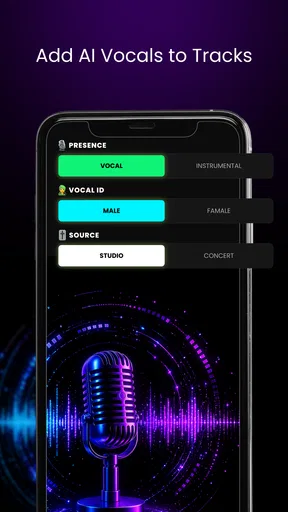
Vocals also need realistic expectations. A vocal input can communicate melody and character, but the generated track may still interpret it differently from a conventional recording workflow. I would use the feature to explore possibilities and compare directions, not to assume that the app will preserve every nuance of my performance exactly.
Exporting is another point where purpose matters. An exported track is convenient for sharing, but convenience should not be confused with complete studio delivery. If I need detailed final mastering, separate stems, or a carefully managed release workflow, I would move the idea into a more specialized audio environment. AI Music Generator PRO X is strongest before that stage, when speed and exploration matter more than microscopic control.
The in-app purchase range is worth keeping in mind while exploring. I would first learn the basic workflow and decide whether the generated results fit my needs before buying anything. A free app can still lead to paid decisions, and the right question is not simply whether an option is available, but whether it solves a problem I genuinely have. Someone making occasional playful tracks may not need the same level of access as a frequent creator.
How it compares with familiar music-making options
Compared with a traditional digital audio workstation, this app is easier to approach because it begins with language and creative intent instead of tracks, plugins, and manual arrangement. That makes it faster for brainstorming and less demanding for beginners. The trade-off is control: a workstation wins when I need to decide exactly where each sound enters, how a vocal is edited, or how a mix changes over time.
Compared with a simple voice recorder, the app offers a much broader creative path. A recorder preserves what I perform, while this tool can help turn an idea, lyric, or vocal into a more developed musical result. The recorder remains better when authenticity and faithful capture are the only goals. I would choose this app when I want transformation and exploration rather than a straightforward recording.
Compared with royalty-free music libraries, it offers a more personal starting point because I can build around my own text or vocals. A library is usually quicker when I need dependable background audio immediately and do not care about developing a unique concept. This app is more appropriate when the track should reflect a particular lyric, mood, or performance idea.
Compared with manual collaboration, the app removes scheduling and communication barriers. I can test an idea alone and share a result quickly. Human collaborators are still better for nuanced musical decisions, emotional interpretation, and back-and-forth refinement. I see the app as a way to arrive at a clearer brief before asking another musician for help, not as a universal substitute for that relationship.
Practical scenarios where it earns a place
Imagine I have written a chorus during a commute but cannot play an instrument. I could enter the central idea, use the lyric as the anchor, and create a rough musical direction before the thought disappears. Later, I could share the result with a friend or use it to explain what I want from a human collaborator. The value is not just the audio; it is having something concrete to react to.
For a short video or personal project, I might need a track that matches a specific emotional turn rather than a generic piece of background music. I would begin with the scene's purpose, create a few focused variations, and select the one that supports the moment without overpowering it. I would still listen carefully for whether the result distracts from speech or visuals, because a good standalone track is not automatically good support music.
A vocalist could use the app as a rehearsal companion for exploring directions. Rather than recording a final performance, I would use a clear vocal idea to test whether the song feels intimate, dramatic, relaxed, or energetic. This can reveal arrangement problems early, before spending time on a more elaborate recording.
Writers may also find it helpful when lyrics feel emotionally clear on paper but musically uncertain. Hearing the words placed into a generated context can expose lines that are too dense, sections that lack contrast, or a chorus that does not stand out enough. I would treat that feedback as a writing tool, not as an unquestionable verdict on the lyric.
My next-step workflow after the first success
Once I have one promising result, I would resist the temptation to generate endlessly. I would identify the strongest element—perhaps the vocal mood, the lyrical hook, or the general atmosphere—and build the next attempt around preserving that element. This gives the session direction and makes improvement easier to recognize.
I would then create a small comparison set with deliberately different goals: one version that prioritizes the words, one that emphasizes the vocal character, and one that explores the broader mood. Listening side by side is more informative than judging each track in isolation. It also helps answer a practical question: am I looking for a song, a demo, a backing idea, or simply inspiration?
For sharing, I would add context when sending the export. A friend can give much better feedback if I say whether I want an opinion on the lyric, the mood, or the vocal fit. Without that context, people may judge the wrong part of the track. The app makes sharing convenient, but useful feedback still depends on asking a precise question.
My overall view is positive, with a clear boundary. This is a fast idea-to-audio tool, not a full replacement for hands-on music production. I like it most when I need momentum: a way to hear a concept, test a lyric, explore a vocal, or create a draft that can guide the next decision. I like it less when I need exact arrangement control or a polished final workflow.
Mor Tosbaa Mobile has made an approachable tool for experimentation, and its average rating of 4.4 from around 639 ratings suggests that many users find the concept worthwhile. The app has passed 100K installs, which also indicates that it has reached a meaningful audience without making it feel like an intimidating professional platform.
I would recommend trying it to anyone who regularly has musical ideas but rarely turns them into audible drafts. Start small, describe one clear goal, listen critically, and keep notes on what changes the result. If that process sounds useful, the free starting point makes exploration easy. If your needs center on detailed editing, exact control, or release-ready production, I would use a conventional audio workstation after the idea stage—or choose one from the beginning.
Pros
- Creates original tracks quickly from simple text prompts.
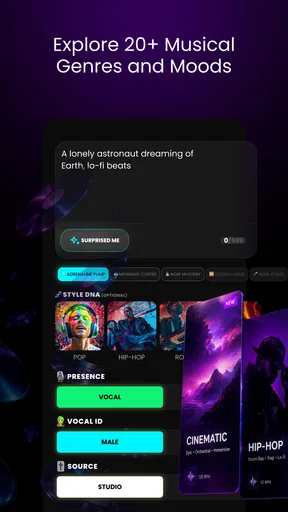
- Offers multiple genres and moods for creative experimentation.
- Useful for generating background music for videos and podcasts.
- Simple interface makes music creation accessible to beginners.
- Can inspire song ideas when you have creative block.
Cons
- Generated tracks may sound repetitive after extended use.
- Results can vary significantly between similar prompts.
- Advanced editing tools may be limited for experienced producers.
- Commercial usage rights should be checked before publishing tracks.
- High-quality generation may require a subscription or extra credits.
FAQs for AI Music Generator PRO X
What is AI Music Generator PRO X?
AI Music Generator PRO X is an application designed to create original music with the help of artificial intelligence. Users can typically choose a genre, mood, tempo, or instrumental style and then generate a track from those preferences. It is aimed at beginners, content creators, musicians, and anyone who wants to experiment with music without needing advanced composition or production skills.
Do I need musical experience to use AI Music Generator PRO X?
No, the app is generally designed to be accessible even if you have never composed or produced music before. Its automated generation tools handle much of the creative process, while the available settings let you guide the result by selecting styles, moods, instruments, or other characteristics. More experienced users may still enjoy it for quickly creating ideas, demos, background music, and inspiration.
Is AI Music Generator PRO X free to download and use?
The application may be available to download at no initial cost, but some features can require in-app purchases, a subscription, or usage credits. Depending on the version, limitations may apply to the number of generations, export options, audio quality, or access to premium styles. Before downloading or subscribing, review the store listing and the app’s payment terms carefully.
Can I use the music created with AI Music Generator PRO X in videos or commercial projects?
This depends on the licensing terms attached to the generated tracks and your account plan. Some versions may allow personal use while restricting commercial distribution, monetized videos, advertising, or music-platform releases. You should read the current license agreement inside the app or on its official store page before publishing generated music, especially if it will be used for business or paid content.
Does AI Music Generator PRO X require an internet connection?
An internet connection may be necessary for generating music because the app can rely on cloud-based artificial intelligence servers to process requests. Browsing saved tracks or using certain playback features might work offline, but generation, synchronization, account verification, and downloads may not. If you plan to use the app while traveling, check which functions remain available without a stable connection.


